Five Questions: Offering Answers on Gear, Techniques and Etiquette

As you might imagine, we get emails from time to time asking us questions about night photography. We’re always happy to respond personally to those questions. However, there’s also the (largely correct) theory that for every person who asks a question, there are a hundred others who want to know the same thing but didn’t ask.

Therefore, we have decided that from time to time we will collect five of the questions that have recently been asked of us, and share them, along with our answers, with all of our blog readers. We hereby commence this β€œFive Questions” series today.

Our first foray into shedding some light on night photography conundrums includes some excellent questions on gear, techniques and etiquette.

1. SharpStar2 and the Nikon 14-24mm
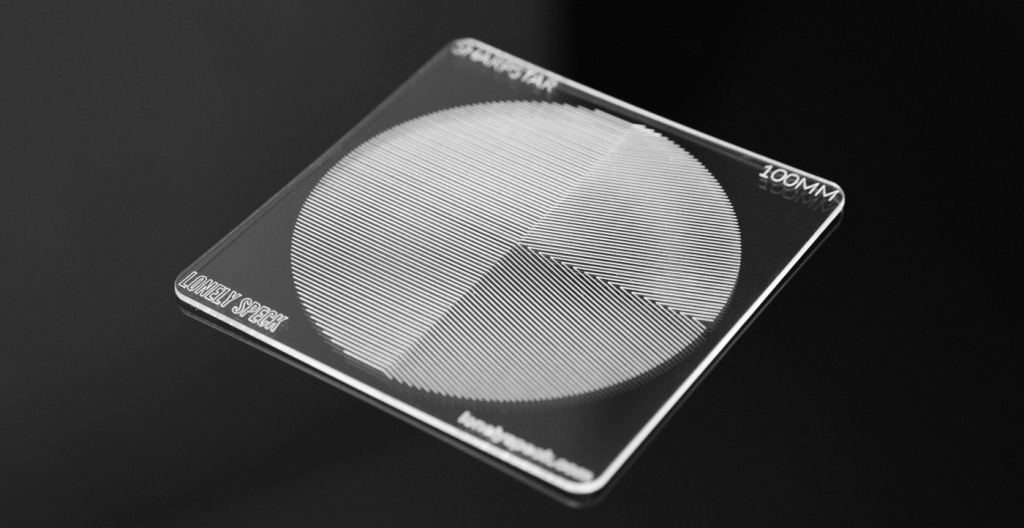
Q: I have the Nikon 14-24mm f/2.8 lens. I have just finished reading about the SharpStar2. In my very limited experience with photographing stars, I have yet to obtain anything close to a sharp focus on them. Thus I’m intrigued by the SharpStar2. Can this be used with the lens I’ve mentioned? I’m assuming I would have to purchase the appropriate square filter holder and the appropriate size SharpStar 2 filter. Could you tell me what size to order, and which filter holder you’d recommend? β€” Liela N.

A: Although the Nikon 14-24mm is one of the best lenses for night photography, it’s actually not one I can recommend for combining with the SharpStar2. In fact, I’m not sure there’s a way to get it to work at all. The issue is that lens has the bulbous front element, which means a flat filter can’t be used without retrofitting a holder. There’s a great article on Naturescapes titled β€œAdapting Filters to Fit the Nikon 14-24mm Lens” that explains why and offers a DIY solution, but it requires a 150mm filter, and the largest that SharpStar2 comes in is 100mm.

But I would definitely hold on to that lens for night photography! If you’d like to work on other techniques for focusing in darkness, I’ll offer three suggestions:

  1. Use Live View. It’s infinitely easier than trying to focus through your viewfinder.
  2. Try presetting your lens to infinity during daylight, then turn off autofocus and tape down the focus ring.
  3. Use hyperfocal distance.

Incidentally, if you’re interested in purchasing the SharpStar2 for other lenses, we have a discount code we can share with you. Use β€œNPAN10” to receive 10 percent off the SharpStar2 on LonelySpeck.com. β€” Chris

2. Stack-a-Matic

Q: I use Photoshop/Lightroom CS6. I am a new user to Photoshop so obviously still learning. I tried to download your recommended Stack-A-Matic but I get an error that says I need Photoshop 12 or higher. What is a good stacking program that goes with CS6? β€” Sue W.

A: Stack-a-Matic works with CS5 thru CC (latest). Did you download it from my website, and use the manual installation instructions? Sometimes it’s a little bit finicky, but it does work. You might have to do a restart, or possibly walk through the installation twice, but it’s worth it.

I’m sorry that I can’t offer more tech support than this for Stack-a-Matic; I’m just hosting it for Russell Brown. Alternatively, you can try StarStax for Mac, and Startrails.exe for PC. β€” Lance

3. Light painting in Arches National Park

Arches National Park. Β© 2016 Tim Cooper.

Arches National Park. Β© 2016 Tim Cooper.

Q: I heard/read that Arches National Park has closed the permits for night photography. Does this mean for workshops or personal? β€” Juan Aguilera

A: Yes, Arches (and Canyonlands National Park) did institute a rule change this year, but it applies only to instructor-led groups using an official CUA (Commercial Use Authorization) permit, and for the moment it applies only to light painting.

If you go on your own as a photographer, there are no restrictionsβ€”for now. But if photographers don’t collectively respect that environment (i.e., behave ourselves), who knows what might change? While we don’t agree with a blanket rule change in Arches, we do understand why it was implemented. We always talk about the etiquette of doing night photography in a way that doesn’t negatively affect others who are enjoying the same dark skies that we’re photographing. (See the early sections of the β€œNight Photography in National Parks” presentation Lance and Chris did at the B&H Event Space a few months ago.)

However, it’s also good to note that if you’re planning to shoot in Arches in 2017, the park will be closed at night every Sunday through Thursday due to road construction. So you can do night photography only on Fridays and Saturdays, until the expected November completion date. β€” Matt

4. Aurora in New England?

Q: Is there any chance of seeing aurora in New England? And is there a good app that you use for potential activity? β€” HersheyArtImages

A: The aurora can occasionally be seen in southern New England, but it is usually just a little bit of green near the horizon in the northern sky, when seen from a dark beach with a view to the north. In the northern parts of Vermont, New Hampshire and Maine, it is seen a little more frequently.

We use an app called Aurora Forecast, which is available for both iOS and Android. Once you download it, you can customize the settings to send you an alert for a kp (the unit of measurement of auroral activity) of 6 or higher in the middle latitudes. If the activity is much less than that, you are not likely to see anything.

You will never see aurora from a light-polluted area so far south. Really strong displays can sometimes be viewed right in the center of Reykjavik –– but that is a much smaller city, with much smaller suburbs. β€” Lance

5. Dealing with light pollution

In this photo from Everglades National Park, light pollution from distant Miami builds up in a 30-second exposure to provide depth to the scene. Β© 2013 Chris Nicholson.

In this photo from Everglades National Park, light pollution from distant Miami builds up in a 30-second exposure to provide depth to the scene. Β© 2013 Chris Nicholson.

Q: I am struggling with processing wide-field astrophotography images (starscapes, Milky Way, etc.). In particular, with how to remove light pollution, which is an unfortunate fact of life for those of us living in the eastern part of the country. For wide-field photographs, the light pollution is usually graduated over the image, being brightest at the horizon and diminishing at you go higher. I would very much appreciate any tips you might have in this area. β€” David T.

A: Honestly, I generally don’t do anything to try to rid light pollution from my night photos, but rather try to use that extraneous light creatively. Specifically, I use the distant light to create silhouettes of mountains, for example, or to light clouds in the sky. Both of those tactics can provide depth to otherwise pitch-dark scenes.

If you do want to negate the color effect of light pollution in the night sky, a tech option is to try one of the new filters for eliminating the color cast in the sky that can be caused by light pollution. Our friends at Lonely Speck recently released the PureNight filter, which is made from a special didymium glass that reduces the transmission of light from sodium vapor lamps. We have yet to try it, but they know their stuff, so it’s likely an excellent solution. We also just heard about the NiSi Natural Night Filter from Ikan, but again, we haven’t had the pleasure of trying it yet. β€” Chris

Chris Nicholson is a partner and workshop leader with National Parks at Night, and author of Photographing National Parks (Sidelight Books, 2015). Learn more about national parks as photography destinations, subscribe to Chris' free e-newsletter, and more at www.PhotographingNationalParks.com.

UPCOMING WORKSHOPS FROM NATIONAL PARKS AT NIGHT

How We Got the Shot: Teamwork at Desert Queen Ranch in Joshua Tree NP

Desert Queen Ranch panorama, as team-photographed by our workshop, April 25, 2017. Photograph by Deane Hall, Jeannine Henebry, Romit Maity, Kurt O’Hare, Priscilla Spencer, Lance Keimig and Chris Nicholson.

If you’ve read our blog in the past, you may have seen our series β€œHow I Got the Shot.” This time we’re doing something similar, but a little different: How We Got the Shot. It’s about how a group of workshop students came together to collaborate on a night image that took a lot of planning, communication and teamwork.

The Location

This week we completed our first workshop of 2017, at California’s Joshua Tree National Park. On the last night of the workshop, we were granted special access to Desert Queen Ranch (otherwise known as Keys Ranch), a spot that’s usually locked off from park visitors. The only way to see the site is to attend a group tour. Night access is rare, but we were able to bring our workshop photographers to the ranch through a partnership with Desert Institute, the educational outreach program at Joshua Tree.

β€œDesert Queen Ranch is a goldmine for photographers ...”

The ranch sits in a rocky canyon in the Mojave Desert. From 1910 to 1969 it was home to Bill Keys, who, along with his wife Frances, raised a family there and lived off the scarce resources of the environment.

Today the ranch is preserved as a National Historic Register Site. It’s a goldmine for photographers, offering subjects such as the small-frame clapboard buildings, old cars in disrepair, mining and ranching equipment, hand-hewn wood fencing, and more. There’s also the same subjects you find in the rest of the park, including rock formations, lizards and snakes, cacti, and Joshua trees and other yuccas.

To give you a sense of the photography opportunities at the ranch, here are some other images by our group from that evening:

The Photographers

Seven photographers at our Joshua Tree workshop (five attendees and two instructors) contributed to making the final image:

The Planning

We arrived at Keys Ranch with our Desert Institute guides shortly before sunset, which gave our photographers time to scout ideas for compositions. One of the more popular subjects was an old, rusting Jeep in the center of the site. As dusk began to darken into night, we noticed that by standing to the west of the Jeep, you get a nice side-to-side view of the ranch structures, including the house, old store, Jeep, windmill, water tank and workshop building.

We immediately knew the scene would make a great panorama, but would be quite a project that could be accomplished only by a good number of us pulling together to contribute. About two-thirds of the workshop was excited by the idea, so we regathered at 11 p.m. to see if we could pull it offβ€”hopefully with the Milky Way rising over the ridge that flanked the eastern edge of the ranch.

Because we didn’t have time for every photographer participating to shoot their own frames, we decided we would do one setup and execution, and we’d all share the RAW files to edit in our own ways. To provide the best image quality for everyone to start with, we chose to use a Nikon D5.

When the time came to start working on the photo, we carefully staked a spot for the tripod. We opted to use my Gitzo 3541LS, as it’s strong and steady, and we could rely on it to stay put during all the movements we’d be putting the ball head through. Using the bubble level on the tripod, followed by using the bubble level on the ball head, we were able to perfectly level the setup within a couple of minutes.

The scene stretched from left to right by about 160 degrees from the tripod mark. (In Figure 1, you can see how wide an area we needed to cover.) We couldn’t back up much because of a fence behind us, so we needed to use a wide angle lensβ€”specifically, the Nikon 14-24mm f/2.8, one of the sharpest tools in the night-photography shed.

Figure 1. Satellite image of our pano subjects at Desert Queen Ranch, showing how wide the scene is from camera position. Map data Β© Google.

Figure 1. Satellite image of our pano subjects at Desert Queen Ranch, showing how wide the scene is from camera position. Map data Β© Google.

Setting the zoom for 24mm framed the scene segments perfectly, but gave us an exposure problem: If we wanted to keep the stars as points, rather than having them begin to trail, then we would be limited to a shutter speed of 15 seconds.

We agreed that a 20-second exposure would be better because it would give us 33 percent more time to light-paint, and would give us one-third of a stop more light to help fill in foreground detail. Using the 400 Rule, we knew that maintaining star points during 20-second exposures would require a focal length of 20mm or wider.

So we set the zoom at 20mm and mounted the camera vertically (which is best for most pano-stitching applications). This setup offered approximately a 60-degree horizontal angle of view within each vertical frame.

The next step was figuring out how much to overlap the frames. The more you overlap, the more information you have for the pano-stitching software to do its job wellβ€”overlapping by at least one-third is recommended. We prudently decided to overlap by half, which gave us a 30-degree horizontal change between frames. By using the degree marks on the base of the ball head, we panned the camera in 30-degree increments and determined we would need to shoot five frames to cover the scene from left to right.

The Lighting

We could have photographed the ranch without lighting it, but what fun would that have been? Besides, the low light on the foreground would have obscured the detail of all the interesting objects in front of us. So we decided to light-paint what we believed were the most important and interesting elements: the store, the house, the tree behind the house, the Jeep, the windmill, the water tower and the workshop buildingβ€”all with 20-second exposures.

Teamwork was clearly required to pull this off.

Priscilla has a film-lighting background, and she shared that expertise to help place two panel lights on the largest subjects: the store and house (Figure 2), and the workshop (Figure 3). For the former we used Priscilla’s Vidpro LED Light Kit, and for the latter we used NPAN’s brand new Luxli Viola 5" Multi-Color LED light panel (which we used for different setups all week, and we loved it!).

Priscilla also stood by the panel on the far left of the image, because she needed to redirect its light mid-exposure. We used in-camera dodging by moving blackwrap in and out of the light to soften the shadow, thereby reducing the illumination on the ground during the exposure.

Figure 2. Vidpro LED Light Kit illuminating the house and store at the far left of our intended pano. This is the setup that Priscilla adeptly modified by moving blackwrap mid-exposure. We weren't concerned about hiding this light source (you can see it in Figures 5 and 8), because we knew it would be cropped out of the final stitched image.

Figure 3. The Luxli Viola LED panel light placed on the far right of the image is perched on a fence post. The only part of it visible to the camera is an LED on the back, which Lance covered with a piece of black gaffer tape so it wouldn't show in the final photograph. So even though the panel is technically in-frame, it disappears into the shadows.

Jeannine and Romit stood to camera-right, about 20 and 30 feet away, respectively. Jeannine light-painted the water tower, while Romit light-painted the Jeep.

Deane and Kurt worked in the background, in-frame, but behind objects so the camera couldn’t see their flashlights. Deane was positioned about center-frame, behind a bush, while light-painting the side of the house. Kurt was positioned toward frame-right, between some tall bushes, light-painting the windmill.

Everyone used incandescent flashlights to provide warm light to the warm-toned subjects. And because the final image would be composed of five stitched frames with overlapping elements, everyone had to repeat the light painting the same way multiple times.

As for the ambient illumination on the ridge, that was thoughtfully provided by clouds diffracting light pollution from Palm Springs. The clouds in the east weren’t as helpful, as they blocked our view of the Milky Way (though you can still discern it if you look closely at the final image). On the other hand, thin and broken clouds can add a good deal of visual interest to a starry sky, and they did exactly that for our composition.

The Shoot

When we were finally ready to execute, we all got into position for our roles. Lance observed the light painting from near the camera to watch for any mistakes that needed to be fixed. (There weren’t anyβ€”go team!) I operated the camera, using a Vello FreeWave wireless remote shutter release; I didn’t want to have to touch or even approach the tripod unnecessarily, to avoid the possibility of bumping it in the dark, which would have required us to re-set everything we’d done to that point.

We began by shooting from the right, primarily because that’s the direction the camera was pointing when we were ready to start. I fired the remote release, waited to hear the click of the shutter opening, then called out for the others to begin light-painting. When each 20-second exposure ended, I rotated the camera 30 degrees to the left (again using the markings on the ball head), then repeated the process four times. You can see the resulting images in Figure 5.

Figure 5. The five frames, before processing. All exposed at 20 seconds, f/3.2, ISO 6400. Nikon D5 with a Nikon 14-24mm f/2.8.

We reviewed the photos and everything looked exactly as we’d hoped. But we always say: Once you get the shot right, shoot another just in case. So we re-shot all five frames, and then wrapped the production.

Post-Processing

Back at the hotel at 2:30 a.m., we imported all the images into Lightroom. We made minor adjustments to one frame, then synced the edits to the other four frames so that each had the same adjustments applied.

Perhaps the most important edit we made in Lightroom is a necessity any time you’re stitching a pano: In the Lens Corrections panel, we selected β€œEnable Profile Corrections.” This removed lens vignetting and corrected barrel distortion (see Figure 6), both of which make it much easier for the software to stitch the images together, and also make for a better final image.

Figure 6. Before applying lens profile corrections (left) and after (right).

We then selected all five frames in Lightroom and clicked Photo–Photomerge–Panorama. Lightroom usually does an amazing job with stitching a pano, but in this case we thought the results looked a little too distorted.

Photoshop’s Photomerge feature has a few more options, so we decided to try that instead. Again with the five frames selected, we clicked Photo–Edit In–Merge to Panorama in Photoshop. We tried the Perspective, Cylindrical and Spherical options, but weren’t thrilled with those results either (particularly Perspectiveβ€”see Figure 7).

Figure 7. Not the result we were looking for. Sometimes pano-stitch settings fail, and we just have to start over, making new choices.

Figure 7. Not the result we were looking for. Sometimes pano-stitch settings fail, and we just have to start over, making new choices.

What did succeed was Photoshop’s Auto option for merging, which is what ultimately produced a result we could work with (Figure 8). This proves the theory that software is pretty smart these days, so always consider trying β€œauto” first.

Figure 8. The uncropped stitched pano, right out of Photoshop.

Back in Lightroom, we made a few more edits. We cropped out the waste (this is expectedβ€”it’s why you should always shoot a pano with extra room on all sides, knowing that you’ll need to crop off artifacts). We brought the Whites up a bit to fill out the histogram. Then we nudged down the Blacks and nudged up the Shadows, which is a nice trick to make an image pop. We increased Clarity a little, and Vibrance a tad.

Those were all the global adjustments we made, which resulted in the image in Figure 9. It was looking pretty good, but there was still more work to do.

Figure 9. Minor global adjustments improved the overall image.

To begin the local adjustments, we immediately cloned out the plane near the center. (No need for editorial integrityβ€”we just pretend that we shot the sequence two minutes earlier.)

To improve the sky, we added a Graduated Filter to the top of the frame, then used the Brush to mask around the ridge. We reduced the Exposure of the sky just a smidgen, and brought up Highlights and Clarity a touch to make the stars shine a little brighter (Figure 10).

Figure 10. The sky pops a little more after making some tweaks with the Graduated Filter tool.

We made some more local adjustments to even out the exposure, reducing the brightness and highlights of the workshop building at the right of the frame, reducing the brightness of the panel-lit ground on the left, and increasing the brightness and saturation (just a bit) of the Jeep (Figure 11).

Figure 11. Local adjustments to slightly darken the ground at left and the structure and ground at right, and to lighten the Jeep in center.

Finally, we pursued the curiosity of one workshop attendee who wondered what the photo would look like if we made adjustments to create more of a β€œnighttime feel.” To achieve that effect we dropped the White Balance temperature more toward blue, lowered Exposure by one-quarter of a stop, reduced Shadows, and dropped Saturation to -30. You can see the result in Figure 12.

Figure 12. A more night-feel approach to the editing.

The night approach looked great, but we decided that we liked our original take better. So we reverted to the first approach, which really shows the light painting that emphasizes the important elements of the composition. Figure 13 is the final version.

Figure 13. The final image.

Final Notes

Though we all made the photo together, the edited final version in this blog post is from my computer. There are many, many ways to edit digital images, dependent on different artistic preferences. I very much hope that Deane, Jeannine, Romit, Kurt and Priscilla will edit the RAW files as they like and post their final results in the Comments section.

Also, none of this would have been possible if the Desert Institute hadn’t partnered with our workshop and arranged for the special access to this very special space. With heartfelt thanks, we recognize Kevin Wong for his assistance at every stage of planning, and Julianne Koza and Lew Kingman for guiding us to and around Keys Ranch that magical evening.

Chris Nicholson, author of Photographing National Parks (Sidelight Books, 2015), is a partner and workshop leader with National Parks at Night. Learn more about national parks as photography destinations, subscribe to Chris' free e-newsletter, and more at www.PhotographingNationalParks.com.

UPCOMING WORKSHOPS FROM NATIONAL PARKS AT NIGHT

How I Got the Shot: Bryce Canyon National Park with Chris and Gabe

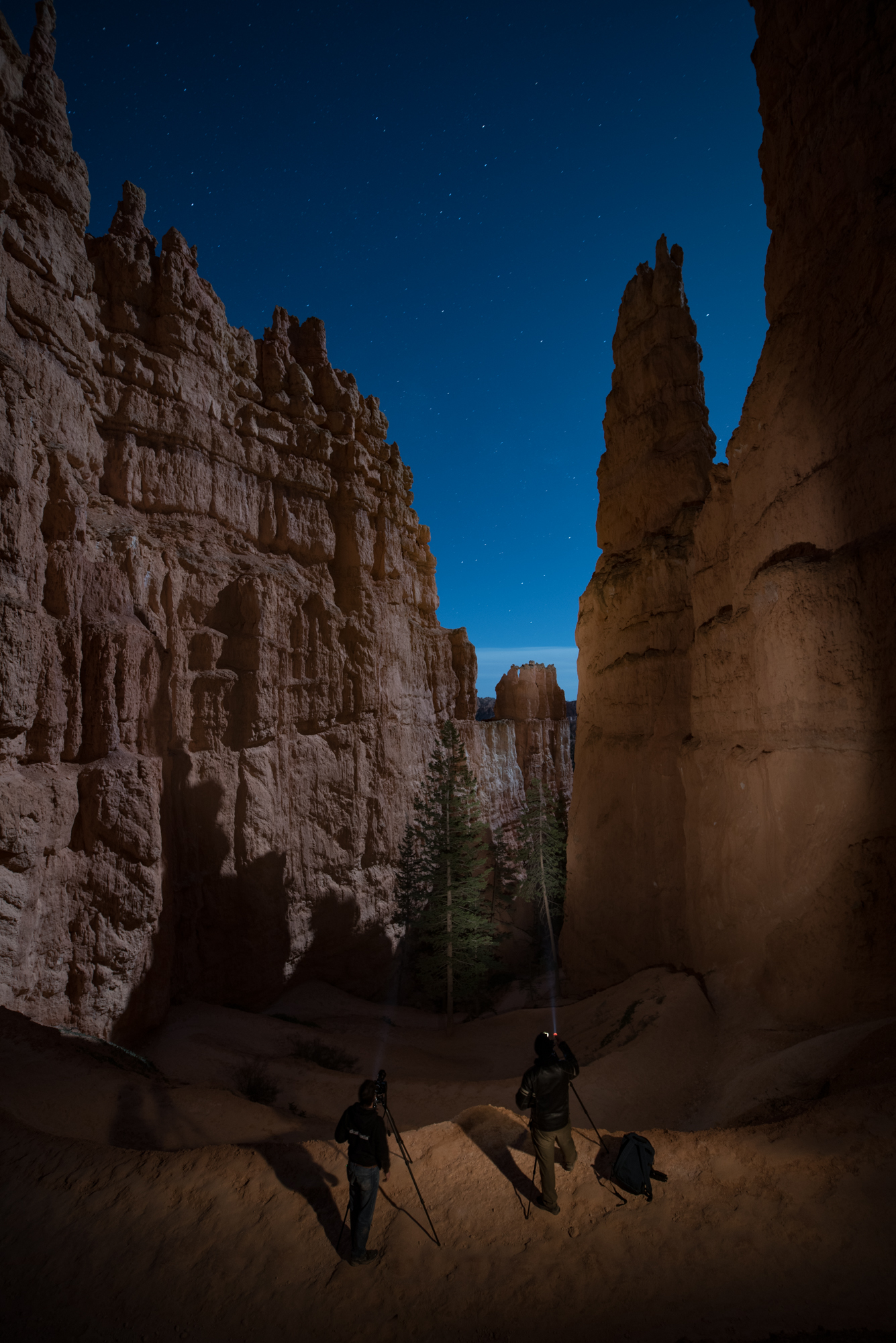
Light painting on the Navajo Loop Trail in Bryce Canyon National Park. 30 seconds, f/4, ISO 400. Nikon D750 with a Zeiss Distagon 15mm f/2.8 lens.

While shooting in Utah during National Parks Week in 2016, I made this image in cooperation with Gabe Biderman and Chris Nicholson. Wanna learn how? Read on.

The Location

First off, let’s establish that Bryce Canyon is beautiful. The hoodoos rock me. It’s also at a pretty high altitude. Consider that if you hike down into the canyonβ€”you must also hike back up!

Top that off with something unique to our visit: One small leg of the loop trail was not open, forcing us to go the long way around to get to the hoodoos. Of course that meant we had to go all the way back around to get back up. Talk about a workout carrying 35 pounds of photo gear on my back. I’m savage with myself that wayβ€”I never want to miss a shot because I left something in the car. (Hint: Do what I say and not what I do if you value your enjoyment.)

Anyway, on to how I β€œmade the sausage.”

Working the Scene

The final image, above, is a combination of ambient illumination by a full moon in a clear sky, complemented by light painting by Gabe and Chris within the lens frame, and light painting by me to camera-right.

I saw the photo as I was gasping my way up the canyon. (I am not as fit as I could be 😊). To compensate, I was playing a game with myself: Walk until completely out of breath, plant the tripod and take a photo on the spot, no matter the view. It kept my mind off my physical condition … for 30 to 120 seconds at a time, anyway.

Figure 1 is an example of one of those shots. Meh. So is Figure 2. Less meh.

Figure 1. 30 seconds, f/4, ISO 400. Nikon D750 with a Zeiss Distagon 15mm f/2.8 lens.

Figure 1. 30 seconds, f/4, ISO 400. Nikon D750 with a Zeiss Distagon 15mm f/2.8 lens.

Figure 2. 30 seconds, f/4, ISO 400. Nikon D750 with a Zeiss Distagon 15mm f/2.8 lens.

Figure 2. 30 seconds, f/4, ISO 400. Nikon D750 with a Zeiss Distagon 15mm f/2.8 lens.

But when I stopped to make a photo of Chris making a photo (how meta), I started to think about how I love making night portraits. This photo is Figure 3, in which you can also see Gabe’s flashlight in the distance. He was working on a masterpiece of light painting.

Figure 3. 30 seconds, f/4, ISO 400. Nikon D750 with a Zeiss Distagon 15mm f/2.8 lens.

Figure 3. 30 seconds, f/4, ISO 400. Nikon D750 with a Zeiss Distagon 15mm f/2.8 lens.

As it happened, I had a burst of energy and my next pit stop to breathe was above Gabe’s position. See Figure 4.

Figure 4. 30 seconds, f/4, ISO 400. Nikon D750 with a Zeiss Distagon 15mm f/2.8 lens.

Figure 4. 30 seconds, f/4, ISO 400. Nikon D750 with a Zeiss Distagon 15mm f/2.8 lens.

As I observed Gabe light-painting and working on his image, I was struck with the thought, β€œThis is the moment. People in a place I love doing the thing I love. Perfect moment for a portrait.”

I asked Gabe and Chris if they would indulge me, and somehow they seemed more than happy to stop climbing out of the canyon for a few minutes. We nailed it on the first shot, because Gabe had already been practicing for his photo, painting to the right. So I piggybacked on his hard work a bit. I asked Chris to paint the trees, and added my own twist by running to camera right and light-painting Gabe and Chris with short bursts of my flashlight (Figure 5). I took care not to sweep my flashlight, because I wanted a pool of light in the middle, with dark edges to the illumination.

Figure 5. Chris (left) is lighting the tree, and the arrows show where Gabe and I are light-painting.

Figure 5. Chris (left) is lighting the tree, and the arrows show where Gabe and I are light-painting.

Mission accomplished!

Figure 6, the final photo. 30 seconds, f/4, ISO 400. Nikon D750 with a Zeiss Distagon 15mm f/2.8 lens.

Figure 6, the final photo. 30 seconds, f/4, ISO 400. Nikon D750 with a Zeiss Distagon 15mm f/2.8 lens.

Details

Here are some more before/after details to spot how we added to the scene:

Figure 7. Painting distant hoodoo.

Figure 8. Light-painting trees takes more time since they are not reflective, but rather dark to begin with.

Figure 9. Gabe’s gentle painting of the canyon wall to his right.

Figure 10. Detail with and without Chris in frame.

Matt Hill is a partner and workshop leader with National Parks at Night. See more about his photography, art, workshops and writing at MattHillArt.com. Follow Matt on Twitter Instagram Facebook.

UPCOMING WORKSHOPS FROM NATIONAL PARKS AT NIGHT

What’s the Longest Usable Shutter Speed for Astro-landscape? (Part II)

In Part I of this article I wrote about the subtleties of managing different variables to determine the best exposure for maintaining star points in astro-landscape photographs. We learned that determining the longest usable shutter speed based on sensor size, focal length and cardinal direction was the starting point for all astro-landscape photograph images.

Additionally, considerations for depth of field and image quality needed to be taken into account. When an image contains a nearby foreground element, a smaller aperture is required to increase depth of field. When an image will be printed to a high degree of magnification, the ISO must be kept as low as possible to maintain image quality. Either choosing a small aperture or a low ISO will require a longer shutter speed, increasing the probability of the stars being rendered as trails or lines in the sky. This is something we try to avoid as much as possible, so finding just the right compromise of these three exposure variables is key to successful astro-landscape photographs.

Under the Milky Way. 20 seconds, f/2.8, ISO. 20mm lens.

Under the Milky Way. 20 seconds, f/2.8, ISO. 20mm lens.

400 vs. 500

In Part I of this article, the concept of the 500 Rule was briefly mentioned without explanation. In this second part, I will explain what it is and how to use it.

An internet search of the 500 Rule turns up a lot of information, much of it contradictory. I have been unable to find a clear answer as to when, how or by whom it was created. It is a fairly crude tool to help with determining the longest usable shutter speed for star points. Simply stated, if you divide 500 by the focal length of your lens, the result is the maximum number of seconds you can expose without star trails with a full-frame DSLR camera. The 500 Rule does not take print size or camera orientation into account, nor does it accommodate APS-C or smaller sensors.

If you delve into those search results, you’ll find a variety of highly technical alternatives and variations to the 500 Rule. If you are as much into mathematics as photography, check out TL-Photography or Greg Boratyn’s sites. My goal is to keep things simple and convenient.

β€œThe 400 Rule results in shorter shutter speeds, and greater likeliness of sharp stars.”

The 500 Rule often yields unsatisfactory results. This is in part due to modern cameras having higher resolution than those available when the rule was first used, and in part because it doesn’t account for camera orientation or the possibility of large-format prints. Therefore, instead of the 500 Rule, I propose using the 400 Rule (divide 400 by the focal length of your lens to reveal the maximum number of seconds before star trails begin to appear). The 400 Rule results in shorter shutter speeds, and greater likeliness of sharp stars.

For APS-C cameras, the 250 Rule yields approximately equivalent results. Another way to determine shutter speeds for APS-C cameras is to use the 400 Rule and then divide the result by the crop factor, which is 1.5 for Nikon and Sony cameras, and 1.6 for Canon cameras. Since our goal is to keep things simple, I suggest using the 250 Rule, which yields almost identical results.

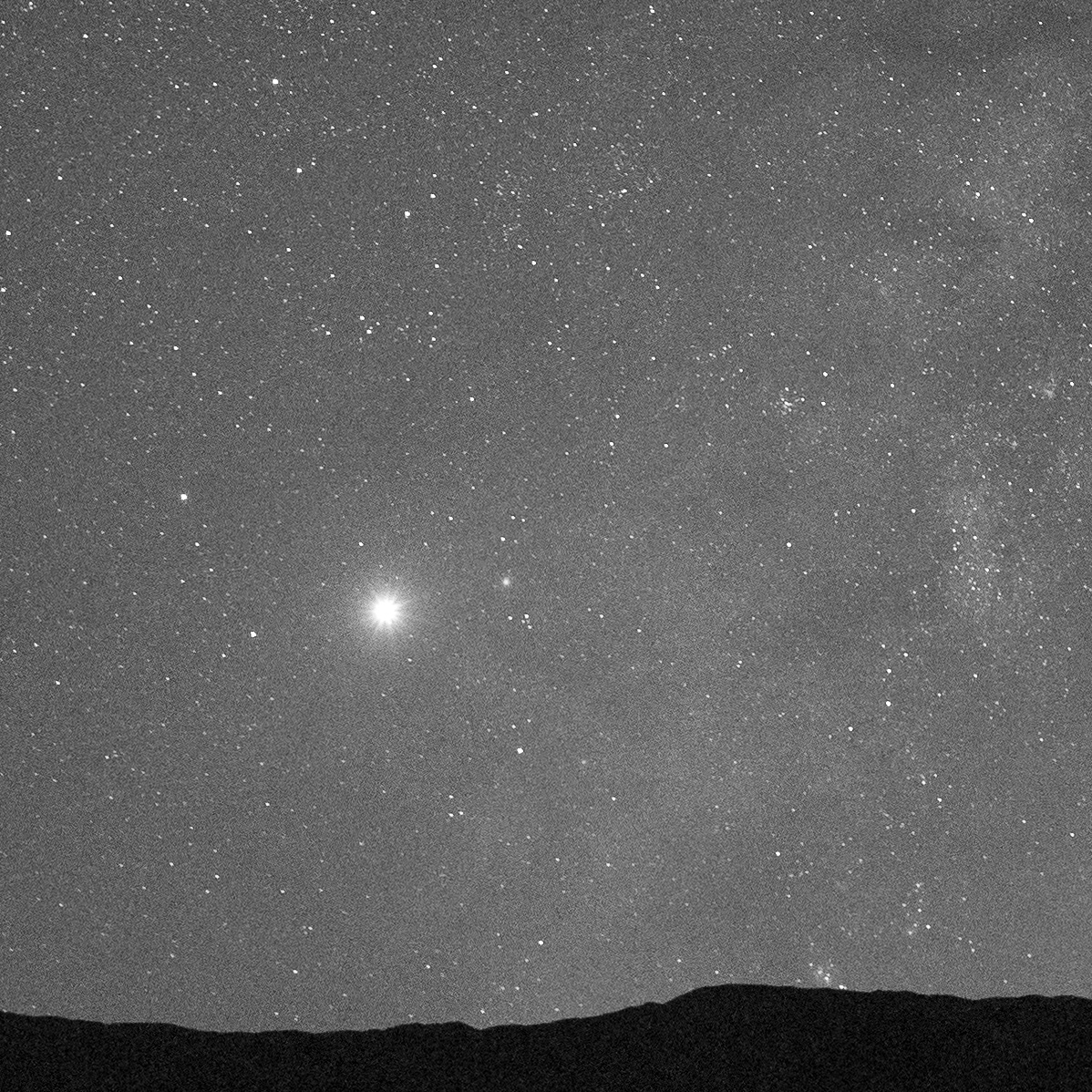
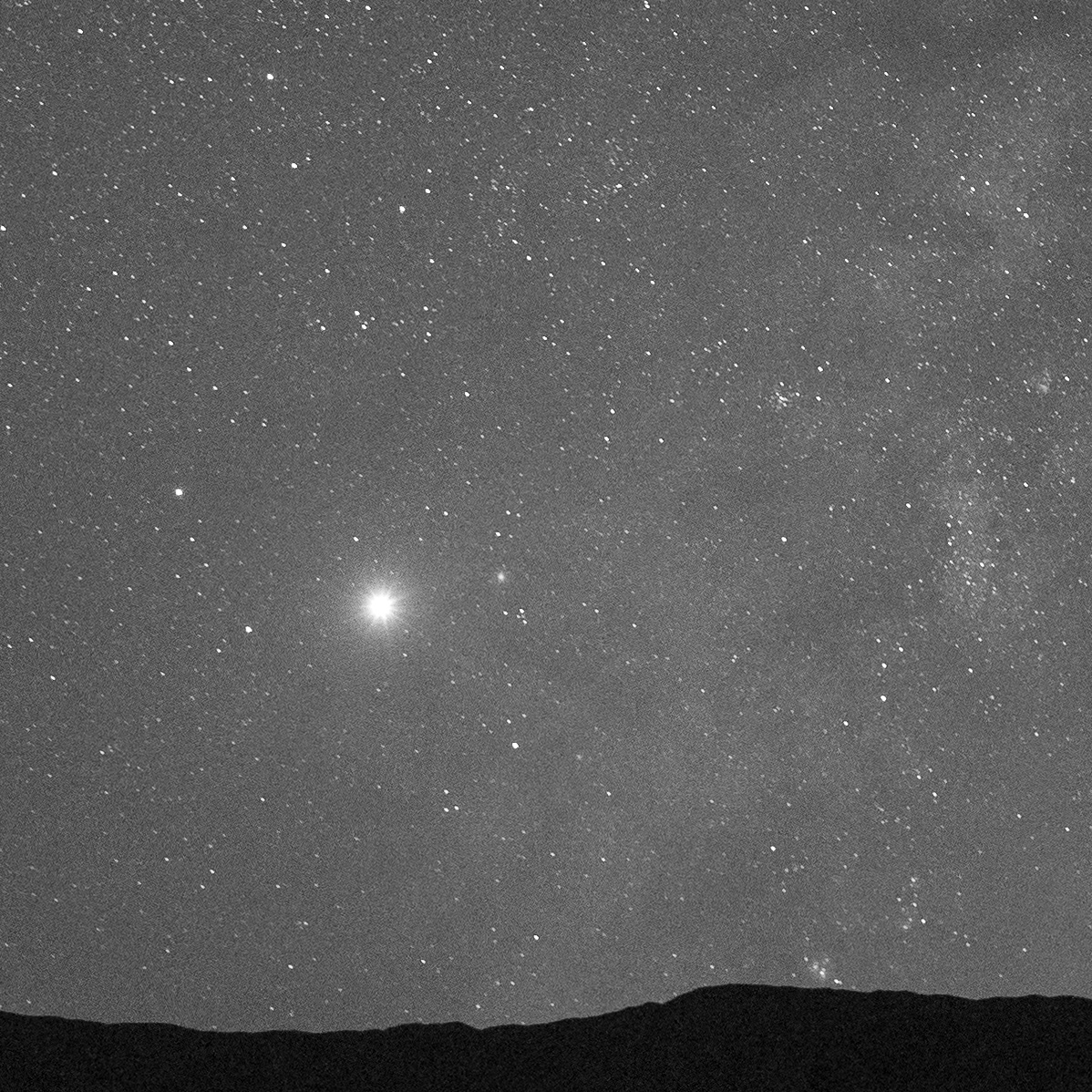
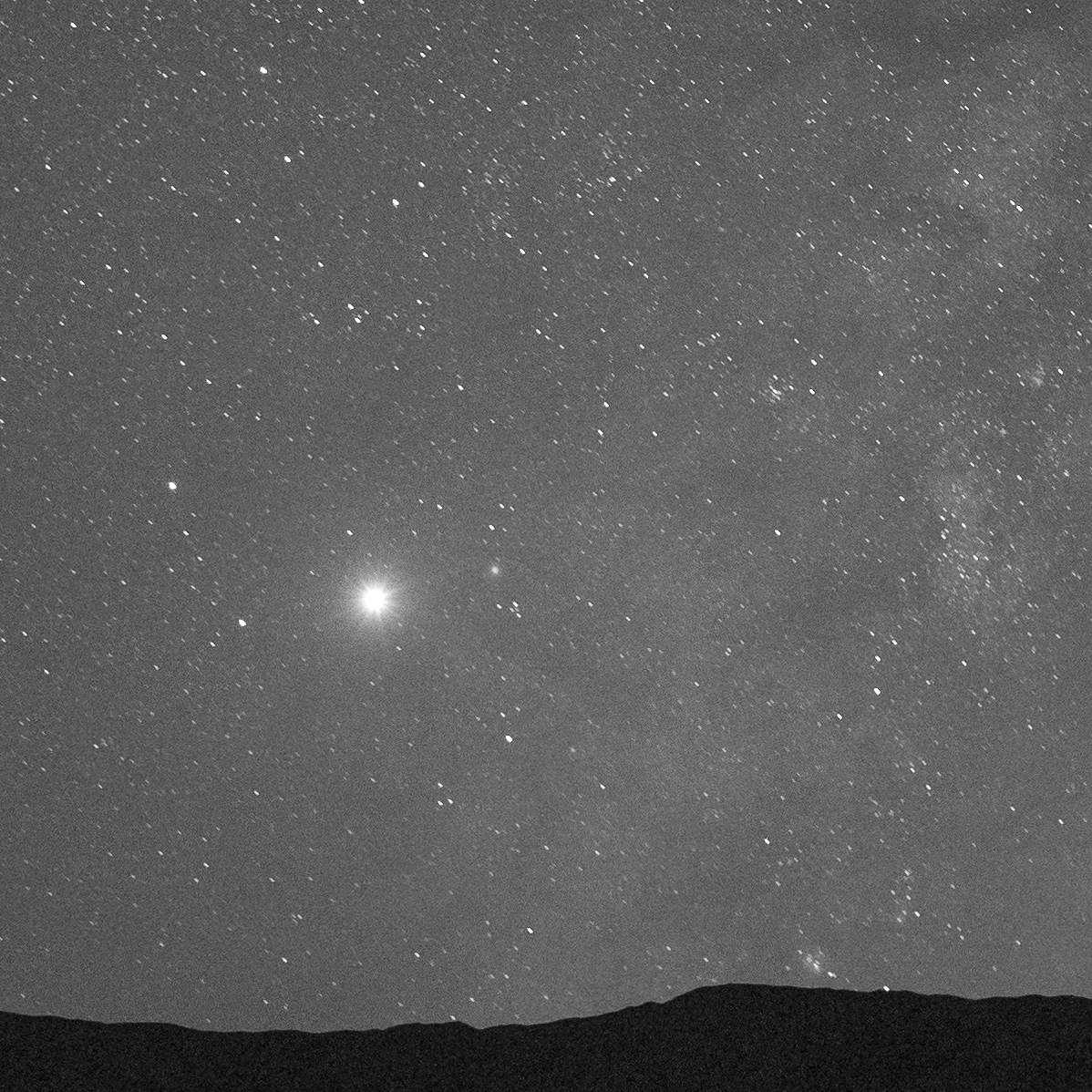
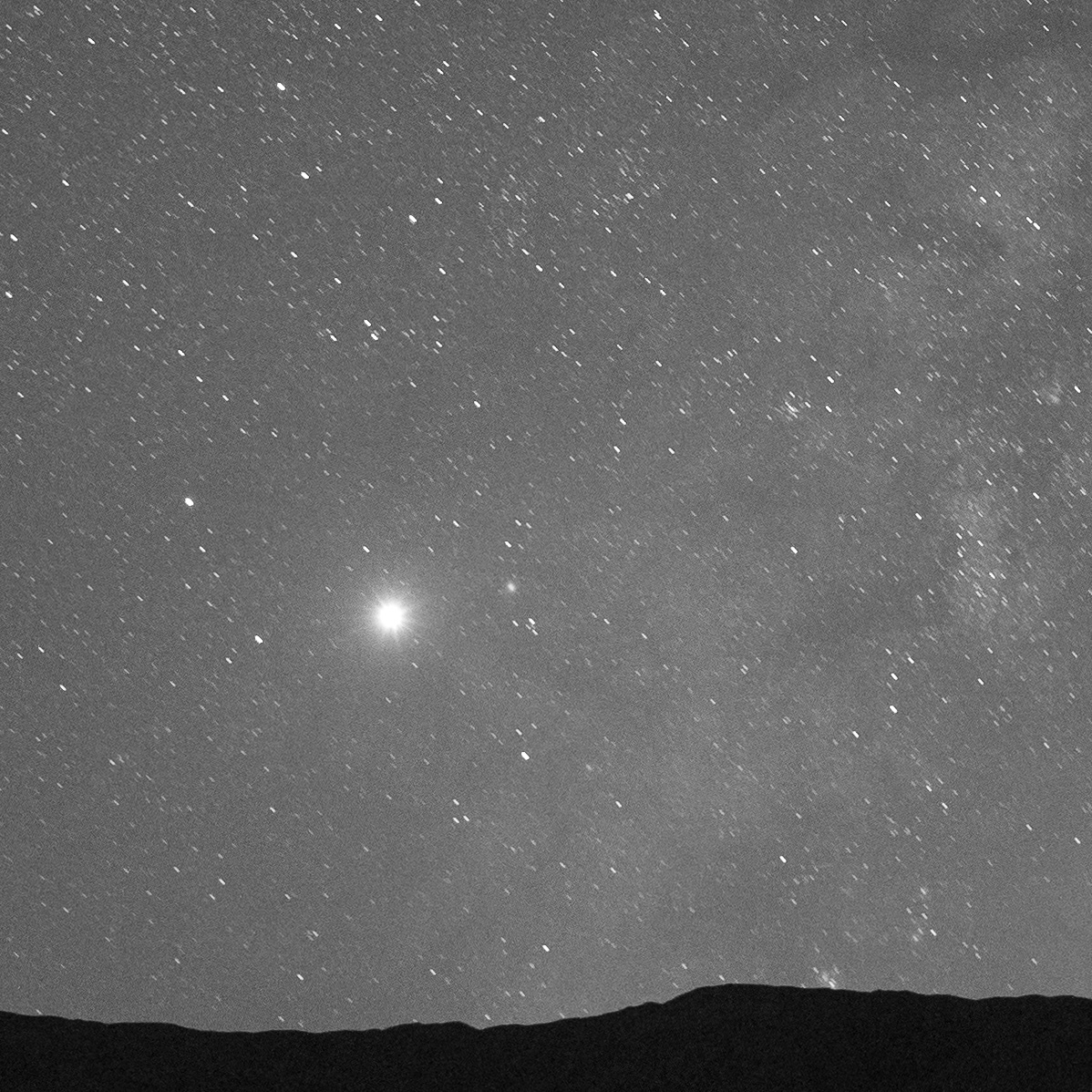
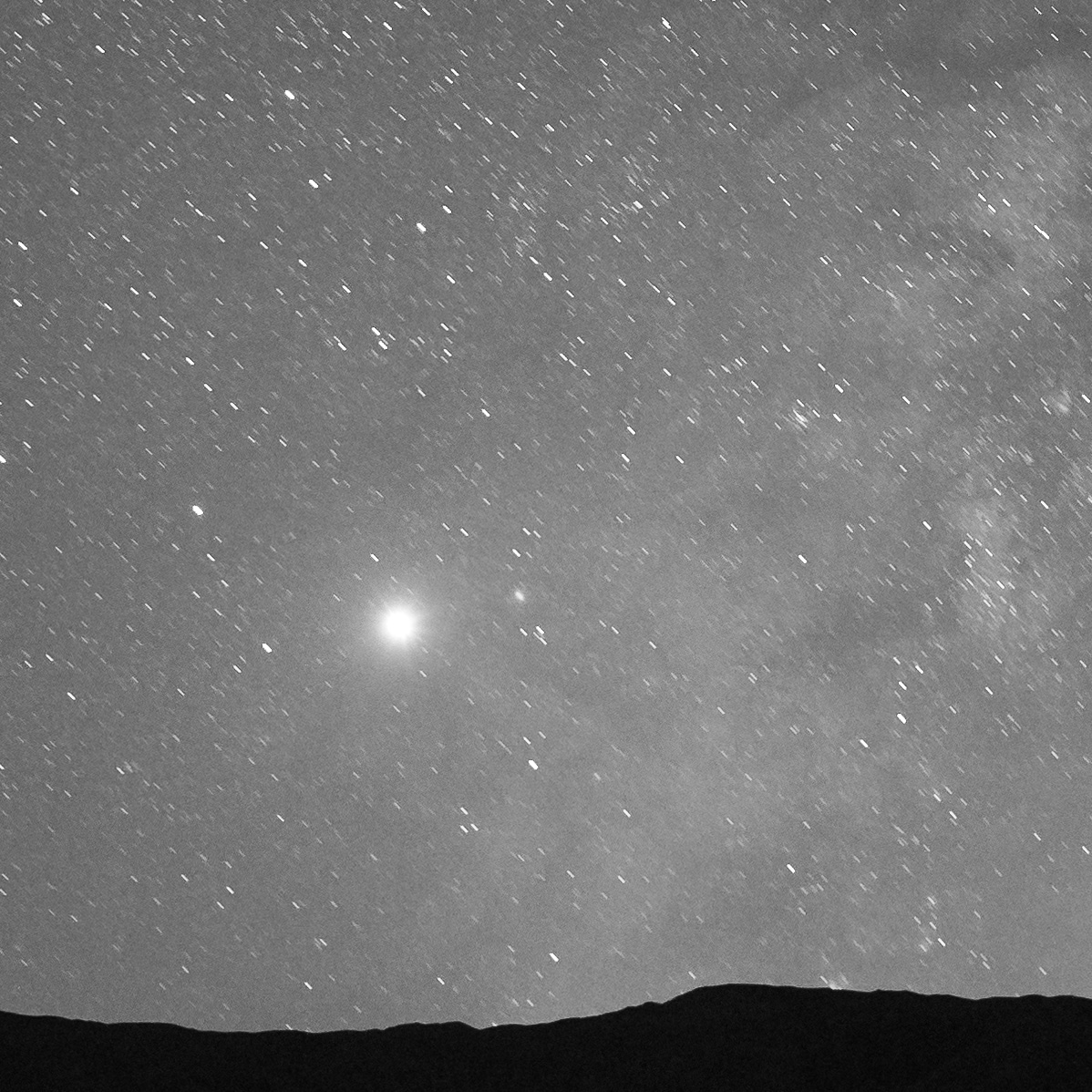
Below you can see the results of test photos shot with a 24mm lens on a full-frame camera, shot at shutter speeds ranging from 8 seconds (very sharp stars) to 30 seconds (very apparent motion).

8 seconds

10 seconds

15 seconds

20 seconds

30 seconds

All of these images were shot with a 24mm lens. Above, see the transition of how much apparent motion is visible at different shutter speeds. Below, click/tap each to view at full size.

Putting This Into Practice

Let’s look at some examples.

For a 20mm lens on a full-frame camera, using the 500 Rule results in a maximum shutter speed of 25 seconds (500 / 20 = 25).

With the same 20mm lens and full-frame camera, the 400 Rule yields a maximum shutter speed of 20 seconds (400 / 20 = 20).

If you use that same 20mm lens on an APS-C camera, you end up with only 10 seconds as your longest usable shutter speed (250 / 20 = 12.5). If you instead use the 400 Rule and then divide by the crop factor, you get 13 seconds for a Nikon APS-C camera, (400 / 20 = 20, 20 / 1.5 = 13) and 12.5 seconds for a Canon APS-C camera (400 / 20 = 20, 20 / 1.6 = 12.5).

If your head is swimming with all of these calculations, remember that the results are constant for each focal length. This means that you can precalculate the longest usable shutter speed for each focal length lens in your bag, and make a cheat sheet to carry with you. This modified rule still does not account for camera orientation, but because you are starting with shorter maximum shutter speeds, it’s more likely that you will end up with star points rather than star trails.

Workshop attendees on the salt flats of Death Valley National Park.

Workshop attendees on the salt flats of Death Valley National Park.

The way to make sure you are using the best shutter speed for the situation is to review your images in camera at full magnification, and adjust the time accordingly. Bear in mind that you should check all sky areas in the frame, because the stars closer to north may be sharp while those farther away are not––even in the same image!

You’ll need to consider the various factorsβ€”star sharpness, depth of field and focus, and image qualityβ€”and make the best exposure decision you can based on prioritizing those factors. It’s a combination of science, art and simply what feels right for the image. Getting to the place where you have a strong sense of when it feels right is simply a matter of practice, so get out there under the stars and photograph.

Lance Keimig is a partner and workshop leader with National Parks at Night. He has been photographing at night for 30 years, and is the author of Night Photography and Light Painting: Finding Your Way in the Dark (Focal Press, 2015). Learn more about his images and workshops at www.thenightskye.com.

UPCOMING WORKSHOPS FROM NATIONAL PARKS AT NIGHT

The Right Angle: Creating Texture and Shape When Light Painting

The word photography means to draw or paint with light. When I first began studying photography, I was told that along with composition, the study of light would be a lifelong endeavor. Over the years, I’ve found this to be an absolute truth.

The master painters knew light intimately. They were genius at using light to define, shape and illuminate their subjects. This skill came from careful attention to the way light wrapped around their subjects. The way it reflected off them. The awareness of color in the shadows and the recognition of specular highlights.

We can learn from them. We can learn from paying careful attention to light and the way it plays on our subjects.

One factor crucial to painting in your own light is the angle of the beam. This is critical in bringing out texture and creating depth in your images (Figures 1 and 2). Painting your subject from the position of your camera will result in the least flattering light. Painting it from the side will produce the most texture and dimension.

Figure 1. Painting at the same angle as the camera will produce the least-interesting version of your scene.

Figure 2. Painting the subject from the side will result in the most texture and dimension.

The two images of the star (Figures 3 and 4) show the difference between a subject painted straight on and one painted from the side. The star in Figure 3 was painted while I stood right at the camera, which was about 8 feet from the subject. Notice how flat the image is; it displays very little depth. The photography term for this is β€œfront-lit.”

The star in Figure 4 was created by standing to the side of the star while painting, very close to the fence, and again about 8 feet away. Everything in the scene begins to show more texture. The star becomes much more three-dimensional.

Figure 3. Created under city lights using an exposure of 30 seconds, f/8, ISO 200, and lit from the front.

Figure 4. Same ambient light and exposure, but lit from the side. Notice how the shadows add texture to the image. (Click/tap either image for larger view.)

An abandoned gas station (Figure 5) made another good subject for showing the difference between a front-lit subject and one that is side-lit. The image was created by simply standing right next to the camera while illuminating the scene.

Whereas I created the image in Figure 6 by painting from many different angles. I divided the painting of the walls into two sections. For the left wall, I stood off to the left but close to the wall and then painted inward. I did the same for the right wall. This left the chair and ground very dark. Placing my flashlight about 8 inches from the ground, I painted across the scene to give the litter-covered concrete lots of texture. I painted the chair last by getting about 5 feet from it and painting downward.

Figure 5. This old gas station in rural Arizona was illuminated using only a flashlight. There were no city lights to influence the overall exposure, but the moonlight was moderate, so I used an exposure of 2 minutes, f/11 to keep the ambient light low. In this image, I light painted from the front ...

Figure 6.  ... whereas in this frame I light painted from the side in multiple locations. (Click/tap either image for larger view.)

This light-painted old building (Figure 7) was a typical situation of establishing the ambient exposure for the night sky and then light painting the buildings. The ambient exposure was 4 minutes, f/8, ISO 200. This exposure left the building quite dark. Using my 65-lumen flashlight, I began by painting the building from the right for about 1 minute, moving further to the right as I painted. Noting the shadows of the porch posts on the building will give you an idea of my angle while painting.

Next I moved onto the porch and stood in front of the far-right window. Hiding the front of my flashlight from the lens, I swung the flashlight from right to left for about 30 seconds as I pointed toward the ground in front of the porch. This caused the light and shadow in front of the house. Keeping my flashlight in one position kept the shadows on the ground sharp. If I had physically moved the flashlight from right to left, rather than swung it from a single position, the shadows would have become softer and less defined. Because I was much closer, the ground is lighter than the building. I then repeated this process standing in front of the far-left window.

To complete the effect, a student popped a flash in the window on the right side of the building and then again on the left side of the building. This gave the impression of interior lights being on.

Figure 7. I love to visit Grafton ghost town during workshops in Zion National Park. On this occasion, I was teaching a night photography workshop with Gabriel Biderman. Our group was focused on shooting the night sky while light painting the various buildings.

In Figure 8, the only moonlight striking the scene is on the ground in front of the truck. The ambient exposure of 2 minutes, f/8, ISO 100 kept the moonlight foreground somewhat dark. Using my 65-lumen flashlight, I started by painting the back wall from the camera’s far left. This distance created a broader beam, which covered most of the wall at once.

Next, I moved close to the truck and somewhat behind it. From this vantage point I painted the grill, fenders and windshield. This gives the truck a heavy side-lit, almost back-lit feel.

At this point I moved around to the right of the camera and painted the truck from that side. I spent less time painting here, so it wasn’t as bright as the other side. Filling in some light from this side helped give the truck dimension and kept it from being pure black in the final image. I created highlights in the scene by moving very close (1 foot) to the headlamps and painting each one for a couple of seconds. To finish the image off, I painted the inside of the cab for a couple of seconds from each window.

Figure 8. I photographed this old truck at Nelson ghost town in Nevada. Our workshop group was photographing under a full moon, but most of this truck was in the shade of the building.

Paying careful attention to the way light wraps around and reflects off of your subject is a great learning experience. Notice light while you’re looking at magazines, watching TV or walking down the street. Take into account the angle, color and quality of the light. When it comes time to supply your own light, remember these lessons. Experiment with different vantage points and keep your flashlight at a severe angle to your camera.

Never paint from behind the camera!

Note: This article is adapted from an excerpt of Tim’s ebook The Magic Light Painting (Peachpit).

Tim Cooper is a partner and workshop leader with National Parks at Night. Learn more techniques from his book The Magic of Light Painting, available from Peachpit.

UPCOMING WORKSHOPS FROM NATIONAL PARKS AT NIGHT